OSC in Scope: Precision real-time AI video control over the network
Scope supports OSC natively for real-time parameter control over the network. Adjust prompts, generation intensity, and pipeline settings from TouchDesigner, Resolume, TouchOSC, or any app that speaks OSC.
Time flies and it's already day 3 of our Launch Week. On Monday, we connected Scope to your local apps with Spout and Syphon. Yesterday, NDI took your video across the network. Today we shift from moving video to controlling it and talking about OSC.
OSC (Open Sound Control) is the protocol that creative technologists use to wire their tools together. TouchDesigner, Resolume, and Max/MSP all support it natively. Tablet controllers like TouchOSC and OSC/PILOT are built around it. It's the standard way to send parameter control between applications in live performance and interactive art, and Scope now speaks it natively.
What makes OSC useful here
If you've worked with control protocols before, you're probably familiar with MIDI.
MIDI is great for hardware controllers and has a massive ecosystem of devices and software that support it. Where OSC comes in is when you need something different from what MIDI was designed for.
MIDI sends integer values from 0 to 127. That gives you 128 steps per parameter, which works well for a lot of things but can feel stepped when you need smooth fades or precise adjustments. OSC sends full float values, so you get continuous resolution across the entire range of a parameter.
The other difference is how they handle multiple applications. MIDI typically locks a device to one application at a time, so running the same controller into two apps requires virtual routing. OSC works over UDP on the network, which means one source can send to multiple apps simultaneously. Your tablet sends to Scope on one port and Resolume on another, both receiving at the same time without any routing setup.
Now, neither protocol is better in absolute terms. They solve different problems. MIDI is the standard for physical controllers and music production workflows. OSC is built for networked, high-resolution parameter control between software. Most professional creative tech setups use both, each where it fits best.
OSC controlability in Scope
Scope exposes all of its parameters over OSC. Every address follows the pattern /scope/{parameter}, and the full list depends on which pipeline you have loaded. Some of the key ones that are always available:
/scope/prompt- change the generation prompt on the fly (string)/scope/noise_scale- control generation intensity (float, 0.0 to 1.0)/scope/transition_steps- how many steps to blend between prompts (integer)/scope/paused- pause and resume generation (boolean)/scope/reset_cache- clear the generation cache for a fresh start (boolean, one-shot)/scope/vace_context_scale- adjust VACE guidance strength (float, 0.0 to 2.0)
Each loaded pipeline adds its own parameters on top of these. Scope validates every incoming message against the active parameter set, so you'll know immediately if an address doesn't match or a value is out of range.
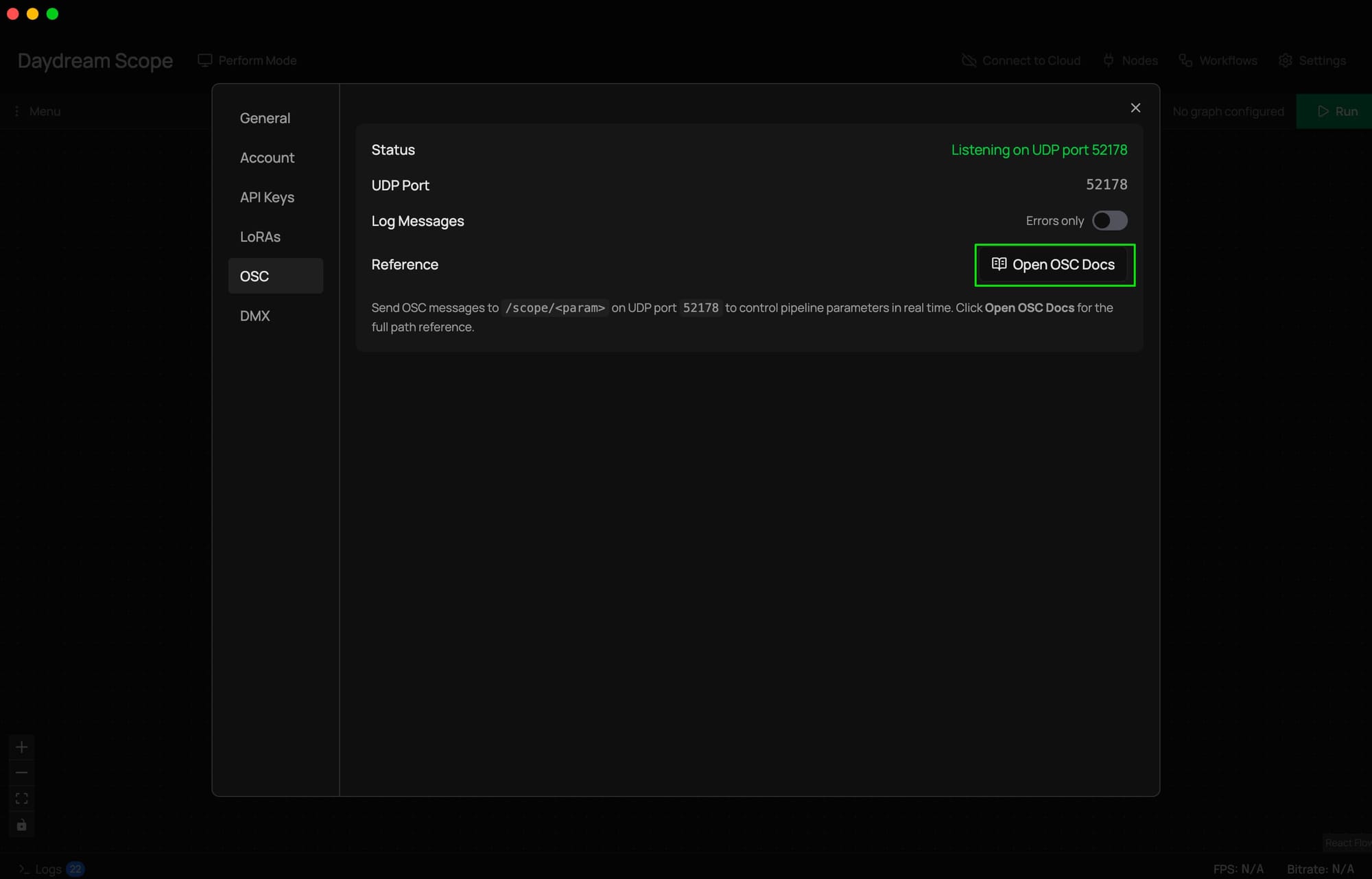
You can see the full list of available addresses at any time by opening Scope's settings, going to the OSC tab, and clicking Open OSC Docs. It generates a live reference page with every controllable parameter, its type, constraints, and example code.
What this looks like in practice
Performing with a tablet is one of the most common setups. Apps like TouchOSC let you build custom control surfaces with faders, buttons, and XY pads. Point them at Scope's UDP port, and you can adjust generation parameters in real time while keeping your hands free for other things during a set.
TouchDesigner workflows get especially interesting with OSC. You can set up an OSC Out CHOP that sends parameter changes to Scope based on sensor data, audio analysis, or any other signal in your TD network. The installation responds to the room. Meanwhile, you receive Scope's video output via Spout or NDI and composite it into your final output.
Multi-app performance rigs are where OSC really shines compared to other control options. One OSC source can control Scope, Resolume, and TouchDesigner simultaneously, with each app listening on its own port. Your tablet or control surface fans out to all of them. No device conflicts, no virtual routing.
Scripted automation is also worth mentioning. A few lines of Python with the python-osc library and you can build prompt sequencers, parameter randomizers, or anything else that feeds into Scope's OSC addresses over the network. The auto-generated docs page even includes starter code you can copy.
How OSC fits with everything else
OSC handles control. Spout, Syphon, and NDI handle video. They're separate systems that work together.
A typical setup looks something like this: your tablet sends OSC to Scope to control generation parameters. Scope processes video and sends it to Resolume via Spout or NDI. Resolume receives the same OSC messages from your tablet for layer mixing. The video and control flows are independent but coordinated, each using the protocol that fits the job.
This is what we mean when we say Scope is a bridge. It plugs into the control infrastructure you already have.
Getting started
OSC is always running in Scope. There's nothing to enable. When Scope starts, it listens for OSC messages on the same UDP port as the HTTP API.
To control Scope from an external app:
- Open Scope and go to Settings > OSC tab
- Note the UDP port displayed (this is where Scope listens)
- In your OSC source (tablet app, TouchDesigner, custom script), set the target to Scope's IP address and port
- Send messages to
/scope/{parameter}addresses
To see all available addresses:
Click Open OSC Docs in the OSC settings tab. Scope generates a live reference with every parameter, its type, valid ranges, and example Python code.
To debug:
Toggle Log Messages to All in the OSC settings tab. Scope will log every incoming message with its validation status, so you can see exactly what's arriving and whether it's being accepted.
Full setup details, including Resolume and TouchDesigner walkthroughs, in the OSC docs.
Community project showcase: Hydra to Scope - live coding your own AI
Diego Chavez is a live visual artist and one of our community members and interactive AI video program cohort finalists, who took OSC integration further than we anticipated.
He built a complete live-coding VJ instrument in which Hydra (a browser-based video synthesizer) feeds into Scope via an OSC bridge he wrote himself, giving him real-time, float-precision control over denoising steps, drift, and prompts while performing.
What makes Diego's setup stand out is how deeply integrated it is. He trained custom LoRA models on his own Hydra output, including one trained on datamosh-corrupted video clips, so Scope generates visuals that actually look like an extension of his existing aesthetic rather than something generic. He then built a prompt sequencer that cycles through prompts on bar boundaries via Ableton Link, so the AI generation stays locked to the music.
The OSC bridge ties it all together. His Hydra fork sends control data to Scope over OSC, adjusting generation parameters in real time as he live-codes. Audio drives color and hue. Beat sync triggers prompt transitions. The whole thing runs as a performable instrument where the AI responds to what he's doing on stage.
He also open-sourced everything: the forked Hydra app, the LoRA models on HuggingFace, his datamosh tools, and the cellular automata plugin code. If you want to see what a fully integrated OSC-driven performance rig looks like, this is a solid reference.
"I built an OSC bridge so my VJ instrument can control Scope's pipeline in real-time. I had control over the denoising steps, drift, and prompts, with float precision. Beat-synced through Ableton Link. The AI performs with me now."
Check out the full project on Daydream.
Follow Diego Chavez: Website | Instagram
What's next
We've been moving video and sending control messages over the network.
Tomorrow, we put the control in your hands. Literally. Knobs, faders, pads - the tactile stuff.
Links
- Launch Week 01 - Follow along all week
- Day 1: Spout and Syphon - Monday's post
- Day 2: NDI - Yesterday's post
- OSC documentation - Full setup guide with Resolume and TouchDesigner walkthroughs
- Download Scope - Get the latest version
- GitHub - Star the repo and check out the source
- Discord - Join the community