What is hosted StreamDiffusion, and why TouchDesigner creators should care
Hosted StreamDiffusion is Daydream's managed version of the StreamDiffusion real-time pipeline, working with TouchDesigner through the Daydream API. You run StreamDiffusionTD as you always have, but the inference runs on our GPUs. No NVIDIA card, Python, or CUDA setup needed, and it works on any OS.
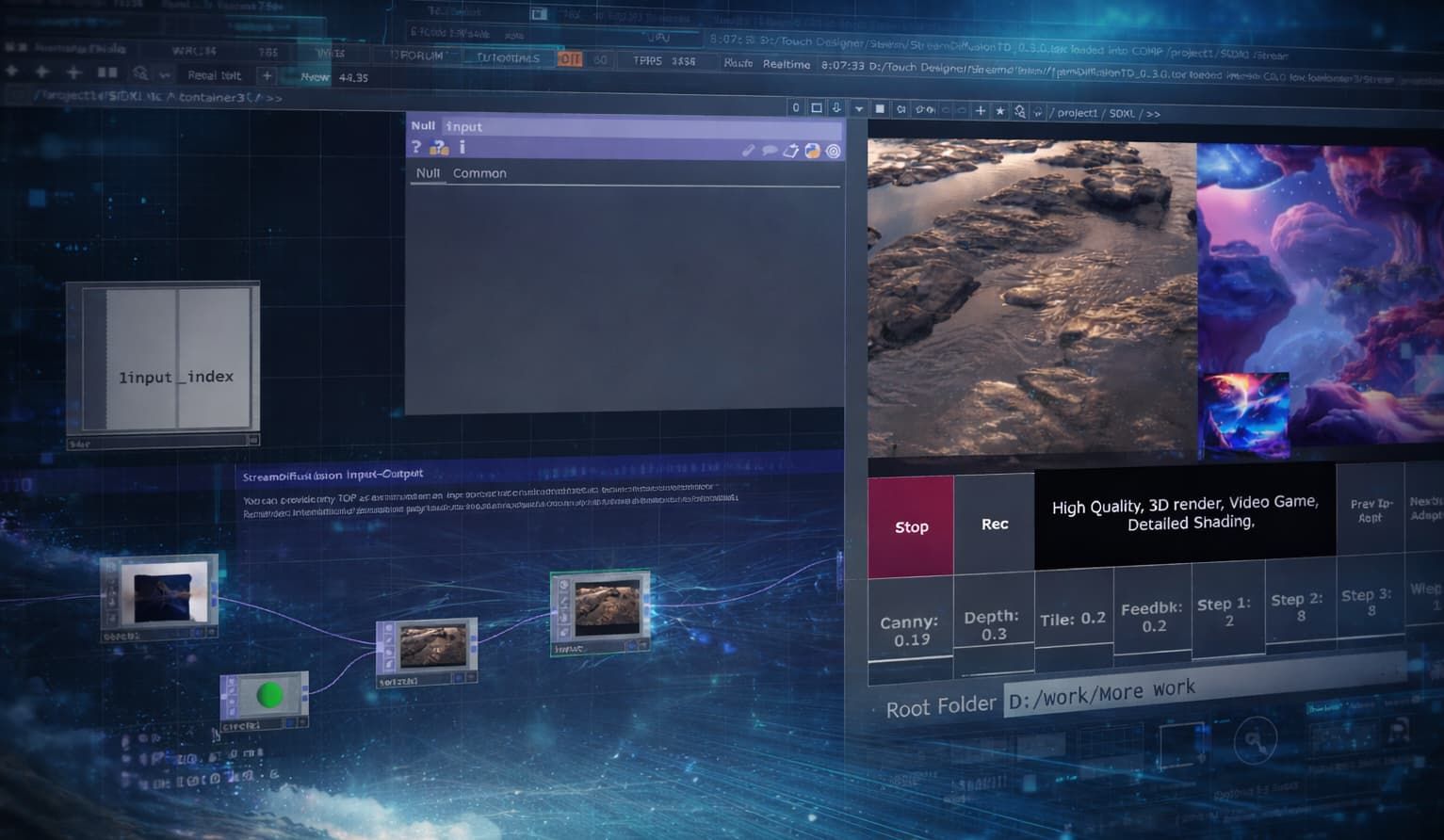
Hosted StreamDiffusion is Daydream's managed version of the open-source StreamDiffusion real-time diffusion pipeline, wired directly into TouchDesigner through the Daydream API.
The short version: you run the StreamDiffusionTD plugin exactly the way you always have, but the actual generation work happens on our GPUs instead of yours. You need no local NVIDIA card, Python environment, CUDA install, and there's no Windows-only lockdown.
As of April 2026, it's the path most TouchDesigner creators on macOS are using to work with StreamDiffusion at all, and the one our team at Daydream has been pushing hardest since the API went live in August 2025.
StreamDiffusionTD, the operator that made StreamDiffusion usable in a TouchDesigner network in the first place, has been the fastest way to get real-time AI video running inside TouchDesigner since late 2023.
The catch was always the same one: you needed a serious Windows machine with an NVIDIA GPU to run it at performance quality, which ruled out every TouchDesigner user on a Mac and a good chunk of creators who just didn't want to carry an RTX 4090 or 5090 to every gig.
Hosted StreamDiffusion fixes that. The same StreamDiffusionTD plugin now runs against the Daydream API's remote GPU, so you get real-time video generation inside TouchDesigner without any of the local hardware or Python setup. If you've been watching StreamDiffusion tutorials from the sidelines because your laptop wouldn't run them, that's over now.
Want to skip the context and just try it? The hosted StreamDiffusion page on daydream.live has the quickstart file, a free API key flow, and more relevant details. The rest of this post is for when you want to understand what actually changed and why it matters for TouchDesigner creators specifically.
A quick history of StreamDiffusionTD
Credit where it's due. Lyell Hintz, known in the TouchDesigner community as dotsimulate, built StreamDiffusionTD a few hours after the original StreamDiffusion research pipeline hit GitHub in late December 2023. His first public demo was an audio-reactive setup posted to X, and the tool has been shipping through his Patreon ever since. It's now on version 0.3.1 with SDXL-Turbo, multi-ControlNet, IP Adapter with FaceID, and a long list of other creative workflows that the community has helped shape through fixes and feature requests.
The reason it caught on is that Lyell approached the project like someone who actually uses TouchDesigner to make things. In a conversation with the Daydream team he put it simply:
"TouchDesigner is the only place this could be controlled from. It can hook into everything else."
The operator exposes the parameters that matter for live work (prompt, seed, ControlNet weights) instead of hiding them behind a black box, so you can drive generation from audio, sensors, cameras, MIDI, OSC, or whatever else you already have wired up.
Running it locally has never been easy
The tradeoff Lyell couldn't fix from inside TouchDesigner was the hardware requirement. The local version of StreamDiffusionTD needs Windows 10 or 11, an NVIDIA GPU with CUDA support, at least 6 GB of VRAM (24 GB recommended for the full feature set), Python 3.10 or 3.11, and a matching CUDA toolchain.
Apple Silicon Macs are out entirely because the upstream StreamDiffusion pipeline has no MPS path, so Mac TouchDesigner users have been watching the tutorials and reading the forum threads without being able to run the thing on their own hardware.
Even when you do have the right machine, the performance curve is steep. The Interactive & Immersive HQ benchmarked StreamDiffusionTD at 55 to 60 frames per second on an RTX 4090, dropping to around 16 fps on a 3060 12 GB, and falling to roughly 4 fps above 1024×1024 (closer to a slideshow than live animation). A community pricing anchor on Derivative put the real number on what it actually takes to do pro work with the local setup:
"$3,000+ RTX 4090/5090 GPU workstation."
For a touring VJ or an installation artist quoting a commission, that's a line item you can't always justify, and it's one you definitely can't drag into the green room at a festival.
What hosted StreamDiffusion actually changes
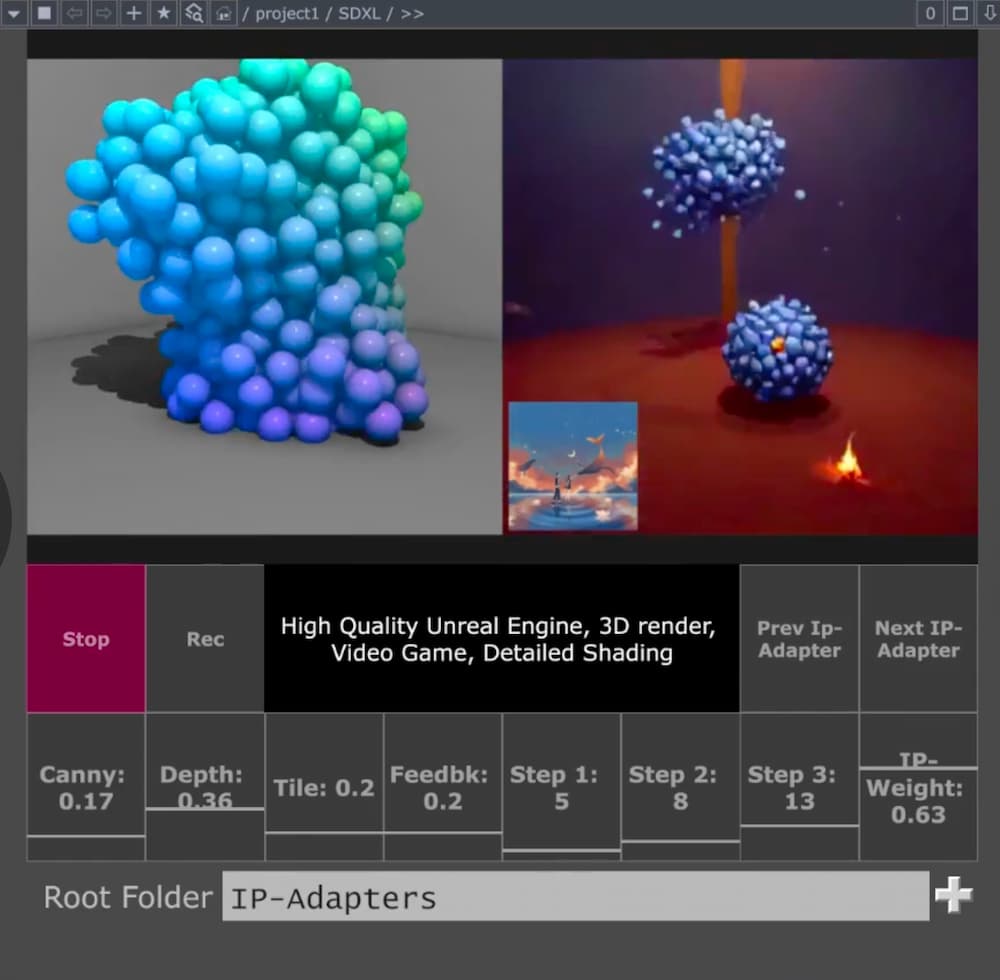
Hosted StreamDiffusion moves all of that inference to the Daydream API. The plugin stays where it's always been, inside TouchDesigner, on your canvas. The actual diffusion work just happens on Daydream's GPUs instead of yours. You drop your API key into the operator, hit Start Stream, and you're generating. The whole setup, as Lyell put it in that same conversation, takes less than a minute.
The list of things you stop needing is the interesting part. You don't need Windows. You don't need an NVIDIA GPU. You don't need a Python environment or a matching CUDA toolchain. You don't need to download model weights, and you don't need to keep them up to date. What you do need is a free API key from the Daydream Builder Dashboard and a machine that can run TouchDesigner and reach the internet. On top of that, the hosted path enables features that are hard or expensive to run locally (multi-ControlNet, IP Adapter with FaceID, TensorRT acceleration), and every parameter stays adjustable in real time while your stream is live.
The biggest shift is cultural more than it is technical. For the first time, the Mac TouchDesigner community isn't shut out of StreamDiffusion work. If you've been building generative systems on an M-series MacBook Pro, you can pipe them through hosted diffusion and back into your network the same way a Windows creator with a 4090 or 5090 in the tower would, without changing operating systems or buying new hardware.
We've felt that shift directly on our end: the questions we used to get started with "what GPU do I need to buy," and the shift to "what should I prompt."
What this looks like in practice
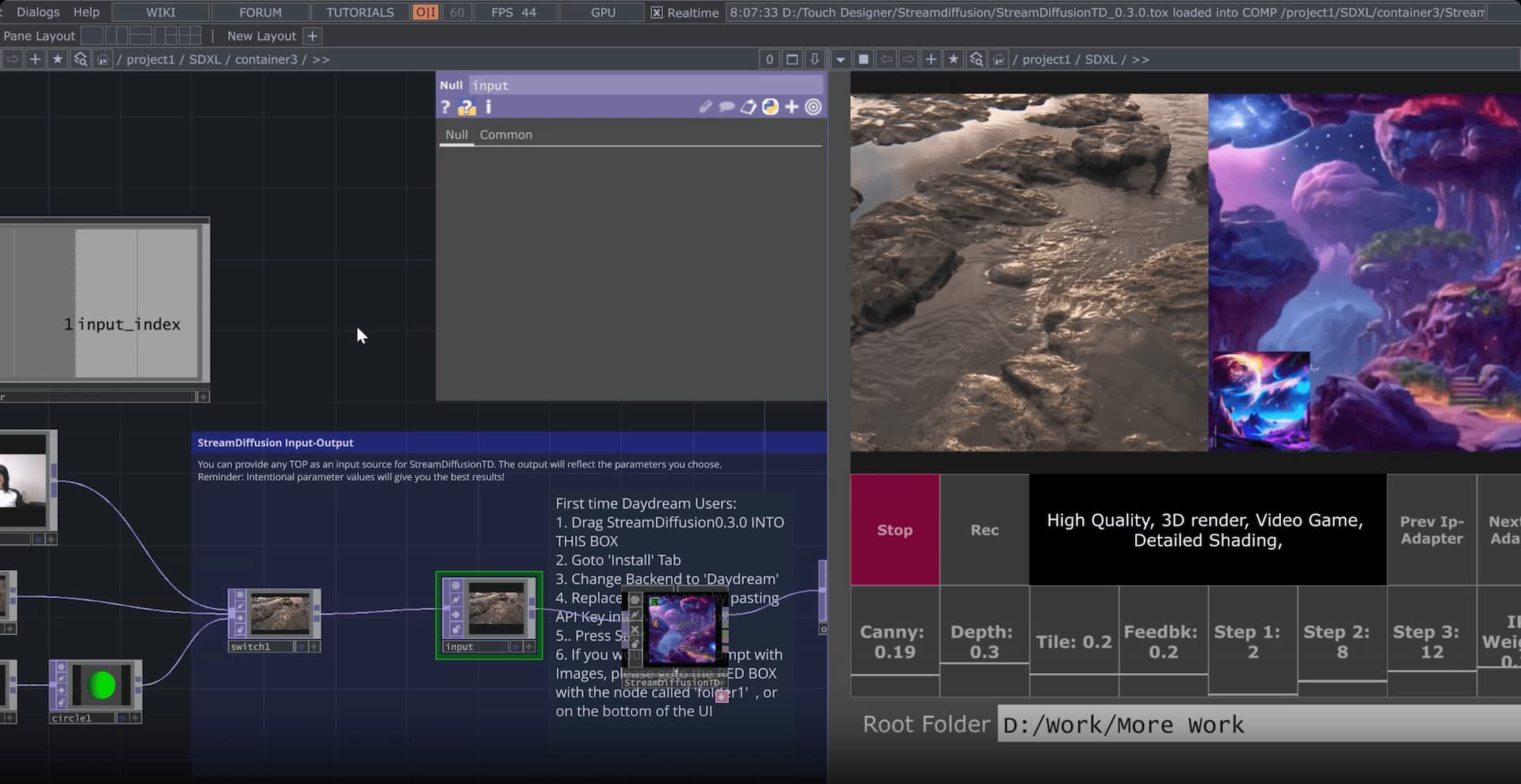
If you're a VJ cutting live visuals, you can drive the StreamDiffusion pipeline from whatever audio-reactive logic you already have in TouchDesigner (CHOPs, particle systems, camera feeds, MIDI from the DJ booth) and have the AI output appear at frame rates that actually sit inside a live set. No pre-rendering, no offline passes, just real-time generation sitting next to your other sources in the mix.
If you're an installation artist, the interesting bit is that the inference is no longer tied to a machine on site. A small Mac running TouchDesigner and calling the Daydream API is a very different shipping and power footprint than a workstation with a 4090 or 5090 in it, and a lot easier to keep stable across a multi-week exhibit.
If you're doing projection mapping or LED work, the hosted path frees up your local GPU for the things TouchDesigner is already good at (shaders, warping, geometry) while the diffusion happens somewhere else. You stop having to choose between "the mapping runs smoothly" and "the AI runs smoothly."
If you're on macOS, this is the first time StreamDiffusionTD has been available to you at all, and the setup isn't a workaround. It runs the same way it would on any other machine that can call the Daydream API, with the same features and the same control surface.
Where to start
The fastest way in, and the one we've been recommending to pretty much every TouchDesigner creator who asks, is Daydream SDXL Easy Quickstart File. It's a ready-to-use .tox that wires StreamDiffusionTD to your Daydream API key with a click-and-drag install, and it gives you real-time prompt editing, multiple ControlNets, IP-Adapter image prompting from folders, and input switching for webcam, video files, and TouchDesigner network sources out of the box. It needs TouchDesigner 2023 or newer on Mac, and 2025 or newer on Windows for the SDXL Turbo path.
If you want the full story, the hosted StreamDiffusion landing page on daydream.live walks through the integration, the model features, and the FAQ.
Lyell's own StreamDiffusionTD documentation is where to go for plugin details and release notes. The Daydream builder story on dotsimulate is worth reading for the origin narrative in his own voice, and if you want a primer on what StreamDiffusion actually does under the hood, our earlier guide to StreamDiffusion and TouchDesigner covers the technical layer.
Where this fits
Hosted StreamDiffusion for TouchDesigner is one of a handful of paths Daydream already offers creatives who want real-time AI video to live inside the tools they already work in.
The other main one is Scope, our local-first desktop app for building real-time video and world-model workflows. Scope is free and open source, with the full source on GitHub.
Where Scope earns its place is in how it talks to the rest of your rig. It ships with a node-based editor and native integrations for Spout and Syphon, NDI, OSC, MIDI, and DMX. Those are the same protocols that already run your show control, your lighting rig, and your audio network, which means Scope can sit inside a live production pipeline without a bunch of glue code.
Scope is what you reach for when you want a purpose-built environment that runs your show control alongside the generation. StreamDiffusionTD on the Daydream API is what you reach for when you want StreamDiffusion sitting inside the TouchDesigner network you've already wired up. Both share the same underlying idea: put real-time video generation in TouchDesigner, in Scope, or wherever else you work, within reach of working creatives without forcing them to change their toolchain or pour the cost of a touring rig into an RTX 4090 or 5090 workstation.
Between them, the audience for real-time diffusion in live visual work stops being "people with a top-end NVIDIA GPU" and starts being anyone with a laptop and a project to ship.
Common questions
Do I still need the StreamDiffusionTD plugin to use hosted StreamDiffusion?
Yes. The plugin is still the interface inside TouchDesigner. Hosted StreamDiffusion moves the diffusion inference to the Daydream API, but you still install dotsimulate's StreamDiffusionTD operator to drive prompts, parameters, inputs, and outputs from your network. The plugin and the hosted backend are complementary, not alternatives.
Does hosted StreamDiffusion work on a Mac?
Yes, and this is the main new capability. Any Mac that can run TouchDesigner will run StreamDiffusionTD against the Daydream API. Local StreamDiffusion has never been possible on macOS because the upstream pipeline has no Apple Metal path. Hosted changes that entirely, since the inference runs on our GPUs in the cloud rather than your machine. If you're on Apple Silicon, this is the first time you've had a real way to run StreamDiffusion in TouchDesigner.
What TouchDesigner version do I need?
Andrew Sun's Daydream SDXL Easy Quickstart File works with TouchDesigner 2023 or newer on Mac and 2025 or newer on Windows. If you're running your own StreamDiffusionTD install without the quickstart file, check dotsimulate's documentation for the version matrix and release notes.
How is hosted StreamDiffusion different from Daydream Scope?
Scope is an open-source desktop app with a node-based editor and native integrations for Spout, Syphon, NDI, OSC, MIDI, and DMX, built for creators who want a dedicated real-time AI video environment that talks directly to their show control. Hosted StreamDiffusion in TouchDesigner is the TouchDesigner-native entry point into the same Daydream API infrastructure. You'd pick Scope if you want the purpose-built environment. You'd pick hosted StreamDiffusion if you already live inside TouchDesigner and want StreamDiffusion to sit there too.
If you're building something on either path, we'd love to see it. Tag @daydreamliveai and come hang out with the rest of the community in our Discord.